
Ecommerce site search: turning searches into orders
Shoppers who search usually know what they want, which makes them your most valuable visitors. When search fails them, they leave. This guide covers why site search breaks, what AI search changes and how to fix it for large and technical catalogs.
Why ecommerce site search fails
Different words
Customers say drywall, plasterboard or gypsum board. Your catalog uses one. Basic search only matches one.
Part numbers
Manufacturer codes, your codes and competitor codes all need to find the same item.
Typos and plurals
Small errors return nothing, and nothing found means the customer leaves.
Vague requests
Something to stop a leaking faucet needs a question back, not a keyword match.
Too many results
Hundreds of loosely related results bury the right one.
No context
Search ignores the customer’s account, branch and past orders.
What AI search for ecommerce does differently
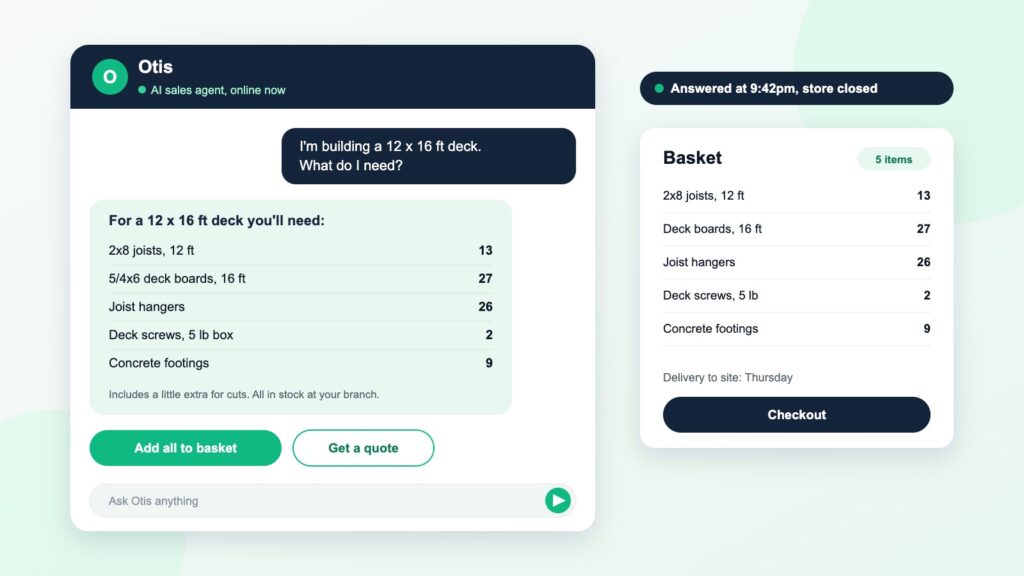
AI search understands meaning rather than matching words. It maps trade terms, sizes and part numbers to the right products, and when a request is unclear it asks a follow up question, the way a good counter assistant would.
Meaning, not keywords
Understands that drywall screws, plasterboard screws and gypsum screws mean the same thing.
Conversation
Lets customers refine by talking, not by hunting through filters.
Live data
Ranks results by stock and shows the customer’s own price.
Learning from failures
Shows you the searches that returned nothing, so you can fix the data gaps behind them.
Ecommerce site search tools compared
| Type | Examples | Best for |
|---|---|---|
| Platform search | Built in search on Shopify, BigCommerce or Adobe Commerce | Small catalogs with simple products |
| Dedicated search tools | Algolia, Klevu, Searchspring, Bloomreach, Constructor | Large retail catalogs that need fast, tuned results |
| Enterprise and B2B search | Coveo, Hawksearch, Elasticsearch based builds | Complex B2B catalogs with part numbers and account rules |
| Conversational AI search | Otis | Technical ranges where customers need help choosing, quantities and quotes |
Many stores combine a dedicated search tool with a conversational agent: search handles the quick lookups, the agent handles the questions.
B2B site search: the extra requirements
B2B buyers search differently. They paste part numbers, search by specification and expect to see their own price. B2B site search needs cross references, unit of measure handling, account pricing and stock by branch, none of which retail search tools do well out of the box.
For builders merchants specifically, see AI site search for builders merchants.
AI product search in practice
A contractor types
Screws for fixing decking to joists, 50 boxes.
Basic search returns
Every product with screw in the name, ranked by how often the word appears.
AI search returns
The right deck screws in stock at their branch, at their price, with a quick question about board thickness to confirm the length.
How to measure search performance
Search exit rate
The share of searches followed by the customer leaving. High numbers point to poor results.
Zero result searches
Each one is a product you stock that customers cannot find, or a range they want that you do not stock.
Search conversion
Orders from sessions that used search, compared with those that did not.
Questions asked
What customers ask an AI agent tells you what your product pages are missing.
Ecommerce site search features that matter
Synonyms and trade terms
Map the words customers use to the words in your catalog, including regional terms.
Part number matching
Exact and partial matches on your codes, manufacturer codes and cross references.
Typo tolerance
Close matches for misspellings without returning nonsense.
Facets and filters
Size, material, brand and specification filters that match how customers choose.
Merchandising rules
Boost in stock or seasonal products, and pin the right result for key searches.
Autocomplete
Suggestions that show products, categories and answers as the customer types.
Analytics
Top searches, zero result searches, exits and conversion by query.
Personalization
Results shaped by the customer’s account, branch and history.
How AI search works
Traditional site search matches the words in a query to the words in your product records. AI search adds two things. First, it represents both the query and the products by meaning, so it can match a request to the right item even when they share no words. Second, it can reason about the request, asking a follow up question or combining several products into one answer.
The best setups use both. Keyword matching is fast and precise for part numbers. Meaning based matching handles descriptions and plain language. A conversational layer on top handles the questions that need an answer rather than a list of results.
How to improve your site search in 30 days
Week 1: measure
Export your top 500 searches and every search that returned nothing. That list is your work plan.
Weeks 2 and 3: fix
Add synonyms, correct product data and set rules for your top searches. Fix every zero result search you can.
Week 4: extend
Add a conversational agent for the questions search cannot answer, then measure conversion by query.
Site search for large catalogs
Catalogs with tens or hundreds of thousands of products create problems small stores never see: near duplicate products, inconsistent attributes from different suppliers and thousands of searches that each happen only a few times. Rules alone cannot keep up at that scale. Clean attribute data, meaning based matching and analytics that surface patterns across the long tail are what keep search accurate as the range grows.
Choosing a site search tool
Ask how the tool handles part numbers, units and synonyms in your sector, how quickly product and stock changes appear in results, and whether it can use customer specific pricing. Ask to test it on your own catalog with your own top searches, not a demo store. And check what it costs as your traffic and catalog grow, since many tools price on searches or records.
Zero result searches: the hidden leak
Every search that returns nothing is a customer telling you what they want and being shown the door. Most come from a handful of causes: a trade term your catalog does not use, a product you stock under a different name, a typo, or a range you do not carry. The first three are fixable in days with synonyms and better data. The last is market research: if customers keep searching for something you do not stock, consider adding it.
Search merchandising for trade
Boost what is in stock
Customers on a job need it today. Rank available items first.
Respect the account
Show trade buyers their own price and preferred brands.
Pin the obvious answer
For your top searches, make sure the expected product appears first.
Promote the complete job
Show the accessories and consumables that go with the top result.
Site search and SEO
Your internal search data is one of the best sources of keyword ideas you have. The terms customers type into your search box are the terms they also type into Google. Use them to name categories, write guides and fill product descriptions with the language buyers actually use. Keep internal search result pages out of the search engine index so they do not compete with your category pages.
Conversational search
More customers now ask questions rather than typing keywords, partly because AI assistants have taught them to. A search box that only accepts keywords forces them to translate their question into your catalog’s language. A conversational layer lets them ask in plain words and get a direct answer with the right products, which is especially valuable on mobile.
Mobile site search
On a phone, search is often the whole navigation. Make the search box visible at the top of every page, keep suggestions large enough to tap, remember recent searches and show stock and price in the results so customers do not need to open each product. Test it with one hand, outdoors, on a weak signal, because that is how contractors use it.
Site search for B2B: a checklist
Part numbers
Your codes, manufacturer codes and cross references all return the same item.
Units
Searches in feet, meters, packs or boxes all find the right product.
Account pricing
Logged in buyers see their own price in the results.
Branch stock
Availability at the customer’s chosen branch shown in the listing.
Specifications
Filters built from real attributes, not text buried in descriptions.
Questions
A way to ask and get an answer when the search box is not enough.
How long site search improvements take
Synonyms and rules can be live within days. Product data fixes take weeks, done range by range. A conversational layer can go live on your best selling ranges within weeks. Measure each step separately so you know what made the difference.
Results from a live deployment
Figures from a UK builders merchant running Otis on its website.
1% to 12.2%
Website conversion rate before and after Otis went live.
55%
Of Otis orders placed out of hours, when no one was answering the phones.
£247
Average basket, because Otis recommends the whole job, not one item.
Common questions
What is ecommerce site search?
The search function on an online store that helps shoppers find products. Good site search understands what customers mean, handles typos and synonyms, and ranks the most relevant products first.
What is AI search for ecommerce?
Search that uses AI to understand intent and meaning rather than exact keywords. It handles plain language, asks follow up questions and can use live price and stock.
Is site search worth investing in?
Searchers are usually the visitors closest to buying, so improving search tends to pay back faster than most site changes.
What is B2B site search?
Site search built for business buyers, with part number and cross reference matching, account pricing, units of measure and branch stock.
What is the best ecommerce site search?
For large retail catalogs, dedicated tools such as Algolia, Klevu, Searchspring and Bloomreach are common choices. For complex B2B and trade catalogs, look for part number handling, account pricing and a conversational layer for questions.
How do I improve ecommerce site search?
Start with the data: export your top searches and zero result searches, add synonyms, fix product attributes and set rules for key queries. Then add AI search and a conversational agent for questions.
See Otis on your own store
Book a call and we will show Otis working on your own catalog. If Otis does not lift your conversion in 90 days, you get your money back.